Pure Blog v3.3.0 adds support for feature images on posts and pages. A feature image serves two purposes: it overrides the site-wide Open Graph (OG) image in the <head> of that specific post or page, and it is available as a variable in custom layouts so you can display it however you like.
Setting a feature image
Open any post or page in the editor. In the sidebar, scroll down to the Images section. Upload an image if you haven’t already, then tick the Feature image checkbox next to the image you want to use.
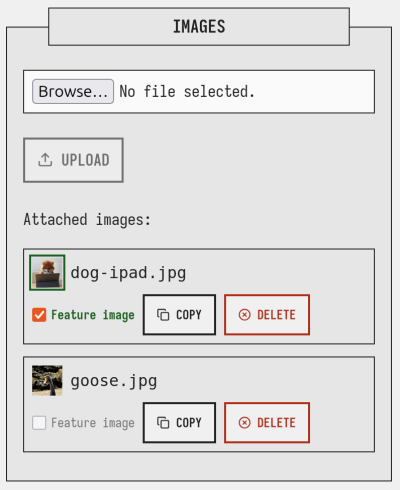
Only one image can be the feature at a time. If you tick a checkbox when another image is already set as the feature, you will be prompted to confirm the change before it takes effect. To remove the feature image entirely, untick the checked box.
The change is saved immediately via AJAX — you do not need to save the post or page afterwards.
OG image override
Once a feature image is set, Pure Blog will automatically use it as the og:image meta tag for that post or page, replacing whatever is configured as the site-wide OG image in settings. No extra configuration is needed.
Pure Blog will then display your feature image instead of the site-wide OG Image when you link to that page/post on social sites.
Using the feature image in a custom layout
The feature image is available as $post['feature_image'] (or $page['feature_image'] on pages). The value is a root-relative path, for example:
/assets/images/my-post-slug/photo.webp
To display it in a custom post layout or layout partial, use base_path() to make the path correct regardless of whether Pure Blog is installed in a subdirectory:
<?php if (!empty($post['feature_image'])): ?>
    <img
        src="<?= e(base_path() . $post['feature_image']) ?>"
        alt="<?= e($post['title']) ?>"
        class="feature-image"
    >
<?php endif; ?>
If you need a full absolute URL (for example, to pass to an external service), use get_base_url() instead:
<?php if (!empty($post['feature_image'])): ?>
    <?php $featureUrl = rtrim(get_base_url(), '/') . $post['feature_image']; ?>
    <meta property="og:image" content="<?= e($featureUrl) ?>">
<?php endif; ?>
Checking for a feature image on the post list
The feature_image field is also available when iterating over posts, so you can use it in a custom post-list partial to show a thumbnail in the blog index:
<?php foreach ($posts as $post): ?>
    <article>
        <?php if (!empty($post['feature_image'])): ?>
            <a href="<?= e(base_path() . '/' . $post['slug']) ?>">
                <img
                    src="<?= e(base_path() . $post['feature_image']) ?>"
                    alt="<?= e($post['title']) ?>"
                >
            </a>
        <?php endif; ?>
        <h2><a href="<?= e(base_path() . '/' . $post['slug']) ?>"><?= e($post['title']) ?></a></h2>
    </article>
<?php endforeach; ?>